flowchart LR
    subgraph trigger_container ["trigger"]
        trigger_node["trigger"]
    end

    subgraph inputs_container ["inputs"]
        input1["Input1"]
        input2["Input2"]
        input_logic["Input logic"]
    end

    subgraph events_container ["events"]
        events_node["events"]
        event1["event1"]
        event2["event2"]
    end

    trigger_node --> input_logic
    input1 --> input_logic
    input2 --> input_logic
    input_logic --> events_node
    events_node --> event1
    events_node --> event2
Juuri Whitepaper
Abstract
Juuri is an end-to-end software platform designed by researchers and clinicians for health research. It provides unified content-creation, data collection and study management tools for decentralised and multi-site research. Teams can create online content and studies utilising standard research principles (CONSORT flow charts, logical rules and automated research-quality data collection).
Juuri was designed to help teams design digital programs without the need for expensive software development and customisation. It has dashboards for research teams, study participants, and clinicians. This provides real-time insights into the status of a research project.
End-users experience a rich web-based and mobile-compatible environment including support for slide-based sequential-page modules, surveys, and video. Statistical analysis of real-time data is possible, including the generation of graphs and comprehensive reports.
Researchers can create content, compose that content into studies and manage the progress of users in studies. Participants accessing the platform are presented with a guided experience which responds to their input and can share aspects of their content with linked users (for example clinicians).
The platform is designed to be easily adapted to a variety of projects and is scalable for thousands of users. As a health-focused platform, Juuri is compliant with Australian privacy and data protection standards. This paper describes the main architectural features and concepts of the Juuri platform.
Keywords
Juuri, whitepaper, technical
Introduction: What is Juuri?
Juuri is a comprehensive research platform designed to help research teams create and manage complex research trials in one central place. It was developed for the Australian market by GreenAnt Networks. 1
The platform has been extensively tested and has been deployed in instances serving thousands of active users across Australia.
Importantly, Juuri is a “platform” not a single program. For instance it can be used for simple health-promotion sites, as well as complex multi-site studies with advanced block-randomisation protocols, and adaptive content presentation. This is achieved through a modular design, in which the core components and concepts combine to allow flexible use-cases.
In the following sections, this document will cover the technical design overview of Juuri, including its Features and Concepts, Architecture, User Interface Components, and an overview of Deployment.
Features and Concepts
Juuri bridges the gap between concept and implementation of programs by providing teams with easy to use tools to:
- Build complete research programs aligned with study protocols
- Present web-based content (including video and media programs for participants, carers, and clinicians)
- Create content in a modular format to enhance reusability
- Deliver programs to participants via the web
- Manage data with real-time analytics and reports
Juuri integrates flexible tools which are easy for teams to use. It provides a number of features which are combined to make it easy to deliver richly interactive content to study participants:
Program Construction:
- Logic rules offer specific content or messages based on a participant’s responses or activity within the study
- Information modules built on open standards
- Simple content import, export, and reuse
- Surveys collect data and link to logic rules
- Data export into JSON, and CSV, with inbuilt data visualisation
- Custom reports for participants or administrators
Integration:
- User-Interactive elements
- Drag-and-drop media and video browser
- Clinician accounts can be linked to participant accounts
- Guardian and carer accounts with visibility based on permissions
- MFA security built-in
- Mobile and web compatible
- Modular design allows easy integration of wearables/AI
Communication & Engagement:
- SMS and email messages based on engagement metrics
- Supports long-term programs with messages and reminders based on time-points
- Group messaging functionality
- Customisable UI for easy branding
- In-platform alerts based on user interaction
In the next sections, the specific implementation of these features will be outlined, but first it will be helpful to introduce some of the terms used to describe the Juuri components.
Contextual Glossary
The following statements define key terms used to describe the structure of Juuri and their inter-relationship. These components are all assembled via a drag-and-drop interface by the research team. No custom software development is required for composing studies.
- A
Studyis a complete program of content made up ofArmsandPhases, a particularArm:Phaseis known as aPart.participantsenter a study via a sequentialonboardingprocess, including consent statements and demographic information- this allows participants to be
randomisedto differentArmsand proceed to their definedPart(s).
- Each
Partof aStudyis made up of a sequenceNodes. There are two subtypes ofNodes:Modules: A presentation shown to theparticipanteither as a single page or a set of slidesSurveys: questionnaires which can be used to collect participant responses.
Modulescan also containembeddeditems, includingSurveys,MediaandInteractivecontent (for example H5P embeddings)
- A
participanttakes aPathfrom one node to the next, based uponRules. Rulescan be triggered at the start and/or end of aNode. They can define:Sequence: the default behaviour of moving to the nextNodeBranching: the nextNodeis selected based uponConditional LogicWait: a specified wait before the nextNodeis availableContinue: a special flag which is used to groupNodesintoStacks, a group of nodes which is shown to participants in a continuous set.
Time-based Rulescan also be set based upon the interval elapsed between two study points (for example the start/end of aNode)Variablesare used to collect data and feed intoRules. They can be collected from:SurveyquestionsParticipantcharacteristics (Global variables)- Progress through the
Study(Tracking variables)
- Conditional
Logicis utilised to buildRulesfromVariablesandConditional StatementsSurveysalso support conditional logic
Software Architecture
Juuri is designed to permit a variety of use cases while also meeting important requirements of scalability and maintainability. The key architectural concepts applied include:
- Service Oriented Architecture: application components provide services to other components, allowing development and augmentation of modular components
- Event Driven Architecture: where possible, events are handled asynchronously via a message system, allowing non-blocking functionality
The Juuri platform architecture has allowed excellent stability and flexibility. The modular organisation allows rapid deployment of new features. Extensive testing at-scale (with thousands of active users) has validated performance, availability and usability of the platform.
Components of Juuri
The following figure shows the main components of Juuri and how data flows are connected between them. As can be seen in this conceptual diagram, data is fed-forward between components for the purpose of building studies.
The components are designed to be accessible from a simple User Interface which allows full programs to be built and administered by non-technical users.
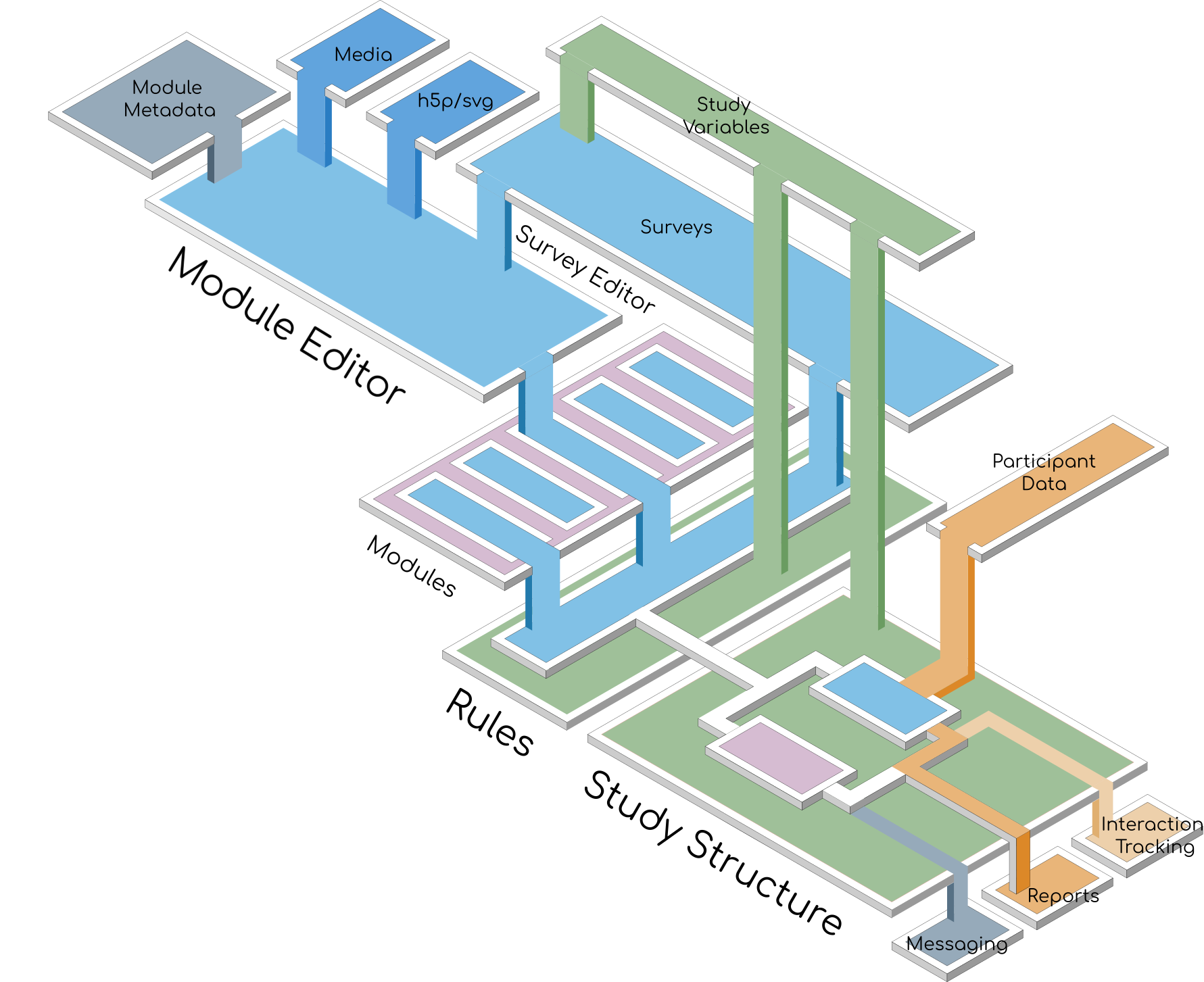
There is a high degree of re-usability of components in Juuri. For instance, a Module or Survey can be re-used in multiple studies, or even more than once in the same study.
Modules and Surveys
The main components which participants interact with are the Modules and Surveys. Users are presented these items in a sequence and can also browse and repeat past content.
Modules
Modules are used to present educational or informative information to participants and can also have a variety of embedded rich media and interactive content.
Juuri utilises fully HTML compatible presentations. A user-friendly editor is provided for editing content (see Module Builder section below). Existing content can also be imported into Modules.
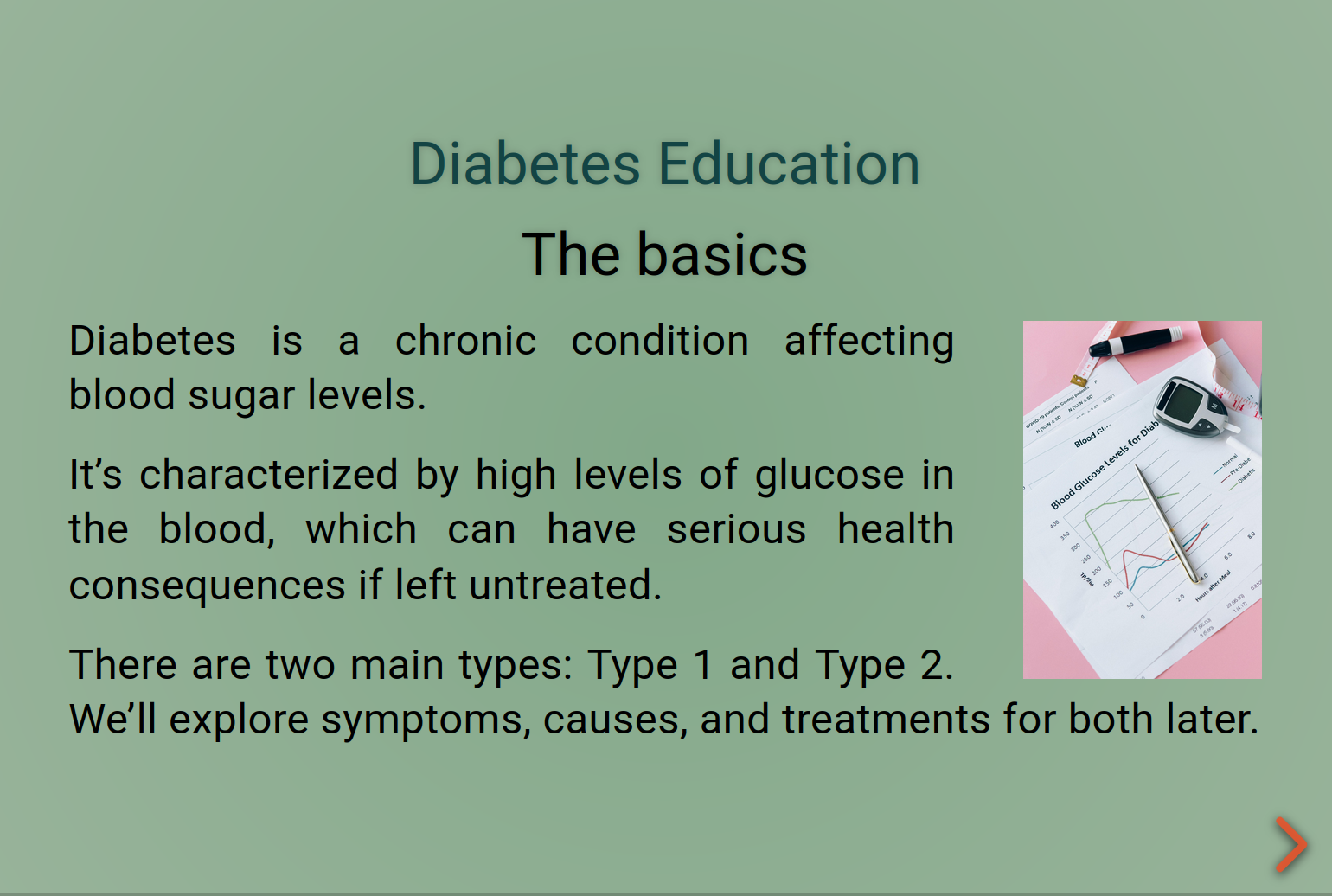
Modules support a number of editor-friendly functions, including the use of templates, a supported media manager, and drag-and-drop editing.
It is also straightforward to integrate other types of Modules, for instance utilising the cmi5/SCORM standard or any web-compatible presentation format.
Surveys
Surveys are the main information-gathering tool in Juuri. Juuri includes a powerful survey building engine. The surveys support conditional visibility, calculations and usability standards. The Juuri Survey Builder allows building and testing multi-part surveys without using any code. A comprehensive selection of question types is available, including:
- radio buttons
- rating scales
- checkboxes
- drop-down questions (including multi-select)
- yes/no answers
- ranking
- text input
- matrix questions
- signature fields
Custom question types can also be easily deployed, including:
- rating gauges
- quizes
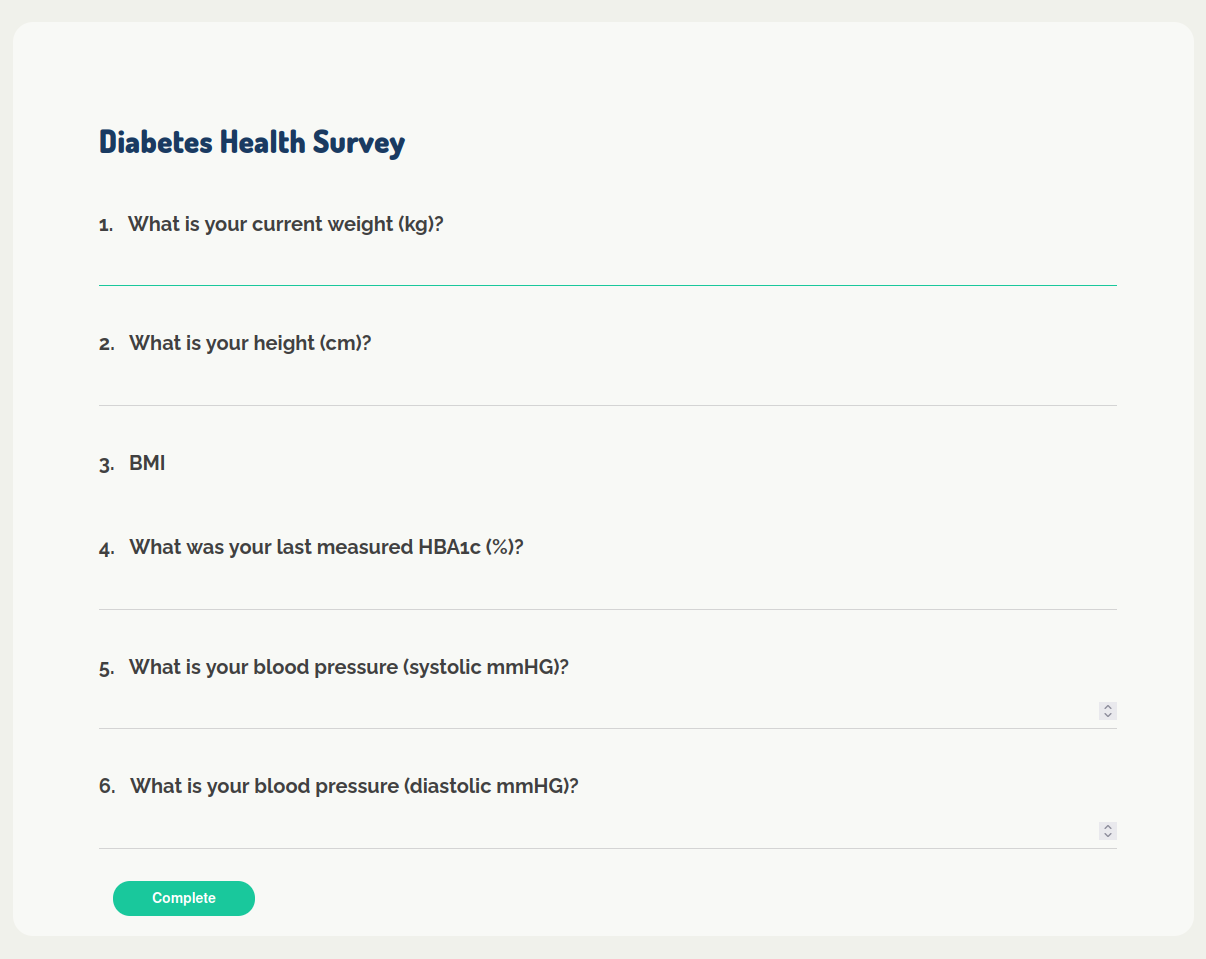
The Juuri Survey Builder also includes functionality has been extended to store scores or question responses as Variables, which can be accessed by general functions outside the survey environment.
This allows survey responses or calculated scores to be easily used to define Rules in the Study Builder.
Nodes and Rules
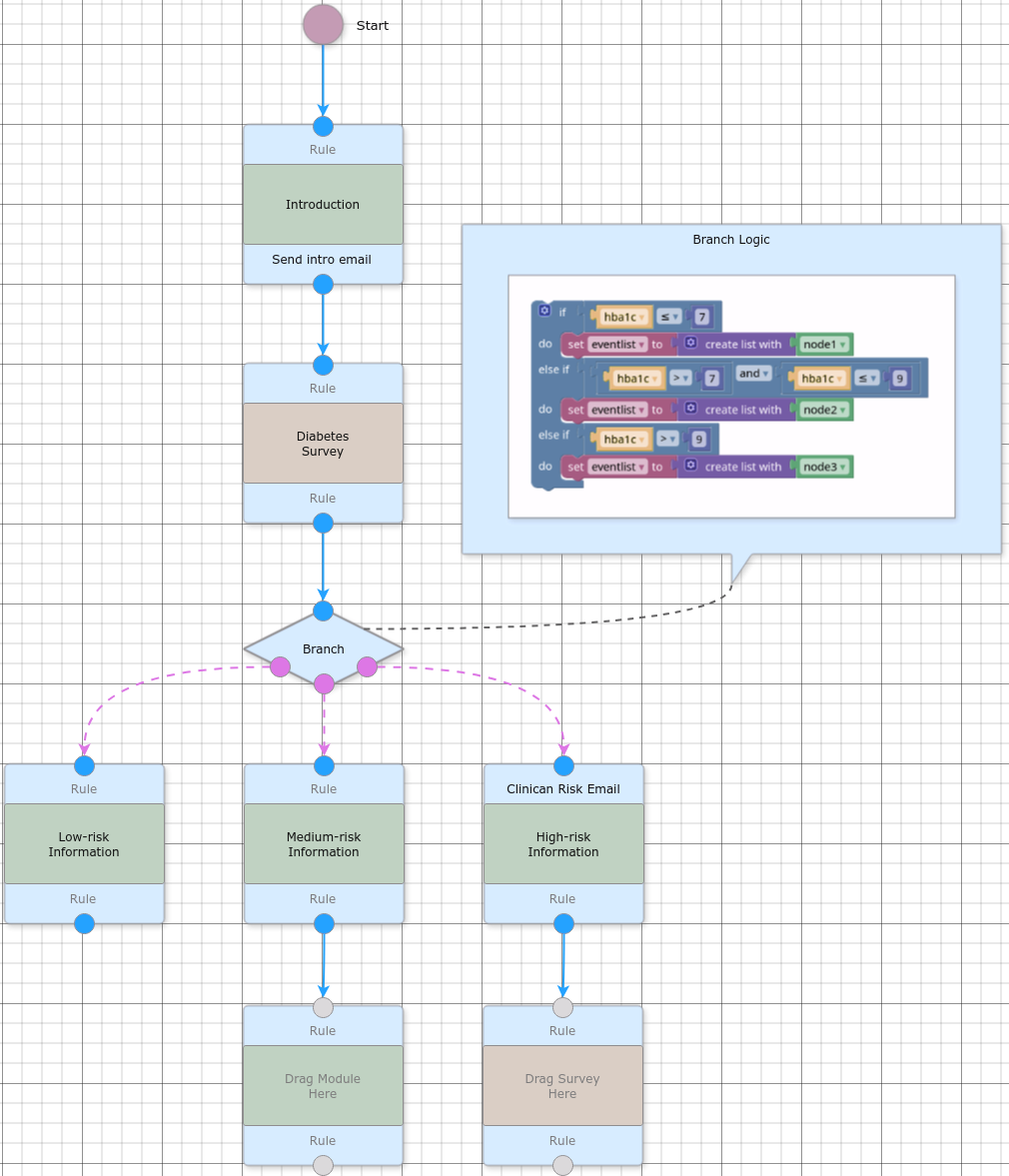
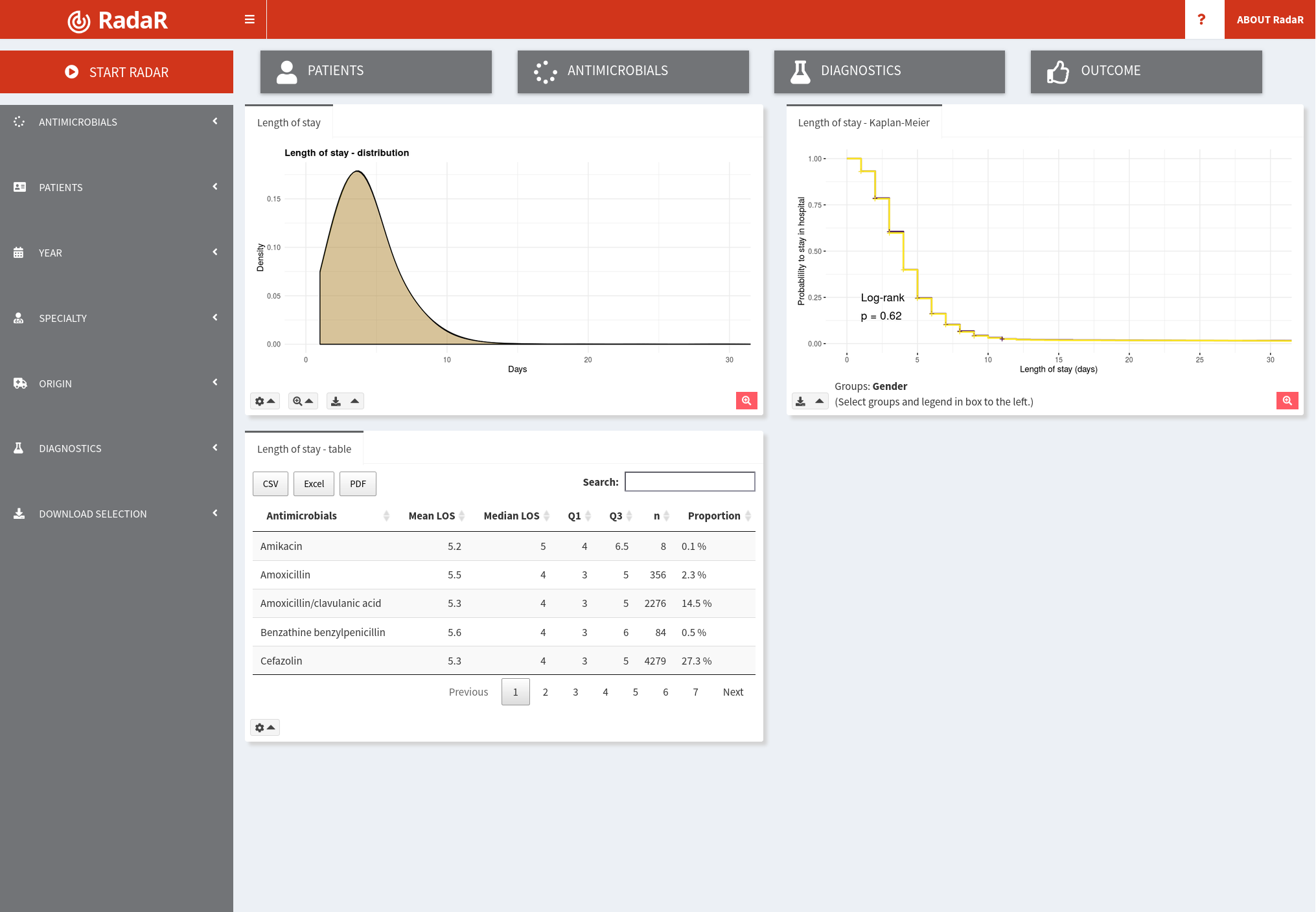
From the perspective of the study administrator/researcher, these components come together in the Study Builder, where the Study Parts can be built up using a flow-chart based design logic (see figure below).
In this example, the researcher can stream users to different branches depending on their diabetes severity (as defined by HbA1c scores stored in a Variable named hba1c).
In Juuri, Logic is built using a block-based visual editor which is designed to permit non-technical users to easily define logical statements (see inset in figure below :Branch Logic)
Messaging
Juuri supports a flexible internal messaging system. This allows messages to be sent to users and groups of users. These messages can be both automated (via rules), or manually sent via the administrative interface.
New messages are displayed to users with a visual notification bell. It is possible to send messages by email, SMS, and via the web interface. These messages can also be hybrid messages (for instance sending the full text of a message to the web interface, but only a notification of new message to SMS).
External messages are sent using standards compliant methods which can integrate into existing messaging systems:
- SMTP-compliant API for Email
- API-based SMS for connection to secure SMS gateways (with support for SenderID)
Furthermore, messaging includes security features which allow notifications to be sent to Email or SMS with the message content only visible to logged-in users.
Data Structure and Indexing
A key requirement for research quality data, is that it is properly indexed and attributable. As participants in a Juuri Study can undertake individualised paths and content is modular in nature, data structuring and indexing needs to be carefully defined.
Therefore, each user going through a study is managed via a specific StudyUser object. This allows auditing of specific user paths. In addition, all survey data is tagged with timestamps, duration, and a particular node index.
Data can be accessed, summarised and graphed in real-time and also aggregated into formats suitable for statistical analysis. Data is stored in a hierarchical JSON-based format. Studies can be exported as data objects in JSON/CSV and analysed using standard statistical tools (R, SPSS, etc.).
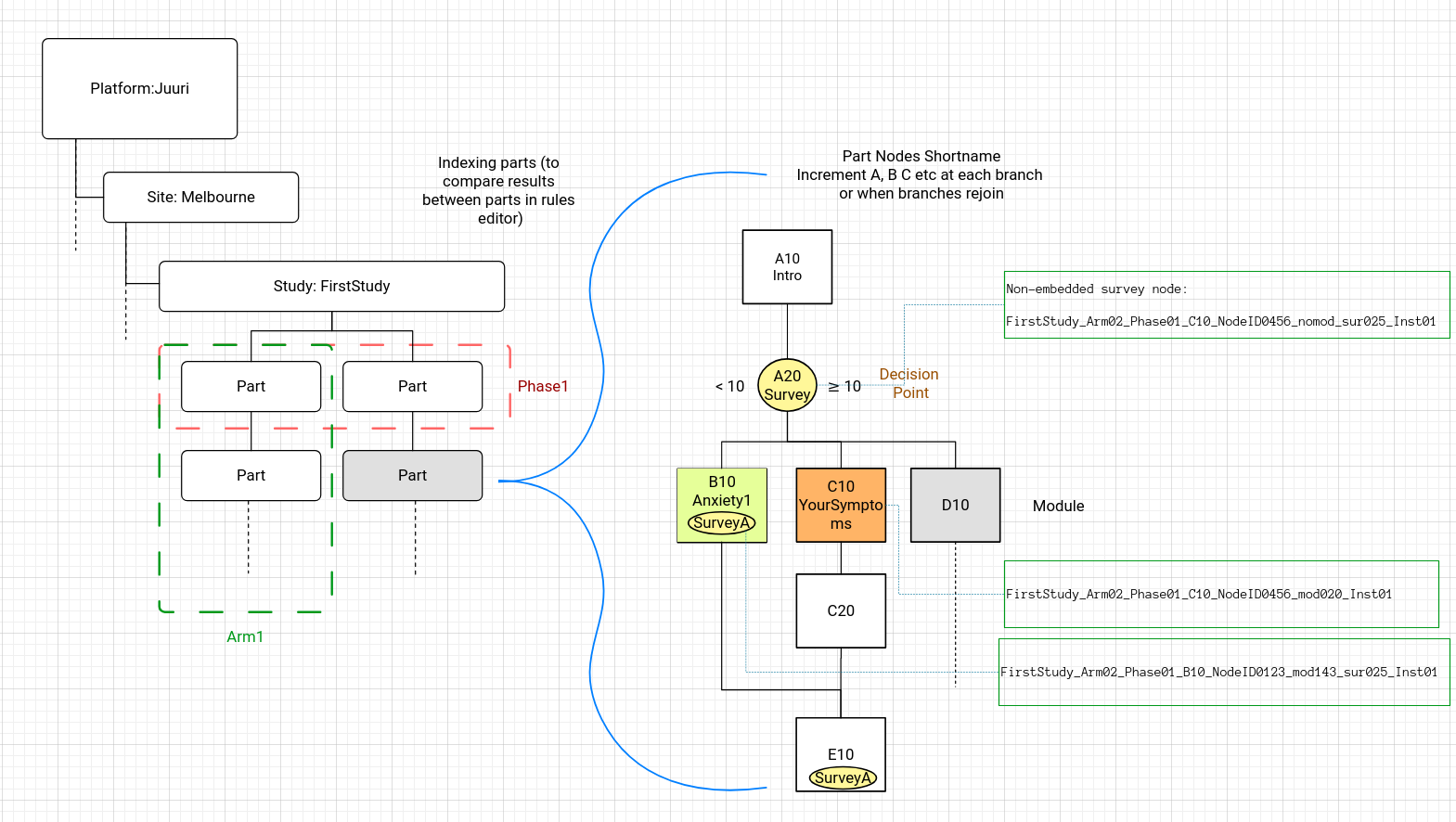
This research-ready data format permits the use of creative data visualisation and analysis. The R statistical language is fully supported, allowing the creation of automated reports and interactive data dashboards.
Rules
The rules management infrastructure of Juuri is a key feature permitting implementation of flexible pathways in experimental design and information presentation to participants.
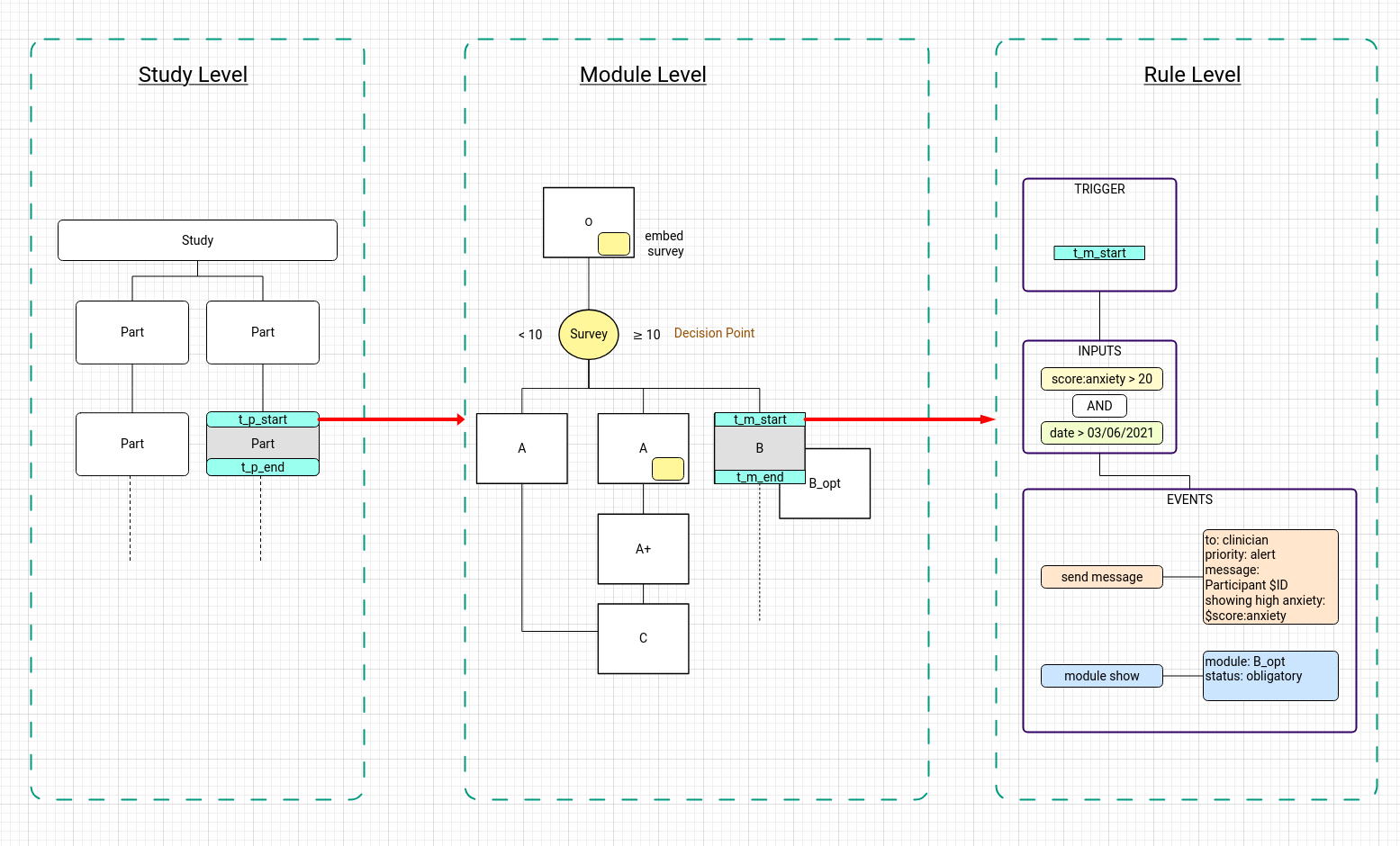
There are four building blocks for rule definitions:
triggers– these define when a rule is executes; examples include:- beginning/end points of
NodesandParts - time-based trigger (triggered via asynchronous jobs)
- beginning/end points of
inputs– these are any type of data which can form the basis for a rule condition; examples include:- date and time
- a score (at a point or on-aggregate)
logic– the logical rules applied to the inputs to decide if events occur- multiple
inputscan be combined with:- Boolean rules (AND, OR, NOT…)
- conditional statements (IF, ELSE…)
- multiple
events– these are the actions carried out by the rule; they include:- selecting content
- sending messages
- sending alerts
- providing additional content (Module/Survey)
These building blocks are connected together with the rule definitions. As a general form, the rule defines the linking of these elements. This is shown in general and specific forms below:
graph LR
    subgraph trigger
        A[at start of Module:M1]
    end

    subgraph inputs
        B[score:anxiety]
        C[date]
        D[if anxiety > 20<br/>AND<br/>date > 02/06/2021]
    end

    subgraph events
        E[events]
        F[send message ...]
        G[show modules ...]
    end

    A --> D
    B --> D
    C --> D
    D --> E
    E --> F
    E --> G
Time Based Rules
Time-based rules utilise a similar structure, with a trigger, inputs and events. However, they are not tied to a particular positional trigger, instead having the trigger defined by two time-points and an interval. These rules can also be very helpful to researchers in identifying missed timelines or compliance targets. Combined with role-based messaging, they can alert study coordinators to key events for auditing.
\[ \text{Logic: } \left( \begin{array}{c} \text{if exists TP2} \\ \text{else current\_time} \end{array} \right) - \text{TP1} \ge \text{Interval} \]
For instance, if:
- TP1 (time-point1) = start(Node:A10)
- TP2 (time-point2) = start(Node:A40)
- Interval = 1 week
Then a participant who takes longer than 1 week to move from Node A10 to A40 will trigger the rule. This type of rule has many use-cases, often being applied to trigger reminders or encouragement to users, or to notify a researcher of a user not progressing.
User Roles
The Juuri Platform has a number of user roles. These allow for content creation, user interaction and management of studies.
Users are assigned to Sites, which can be used to design multi-site studies while segregating data between sites. In addition, users can be assigned to Groups which are a subclass of Site.
participant- the end-user who participates in studiesguardian- the parent/guardian(s) of the participantsclinician- healthcare workers assigned to provide professional help to participantsresearcher- can create content, view progress and design studies at their sitesite admin- can also administer users at their sitesuper admin- can administer all sites, studies, and users
New user roles can be built for specific study requirements if required.
User Flow
Participants using the Jurri platform follow a specified onboarding and study flow.
There are two main ways to stream participants into studies:
- via a study website
- via direct link/QR-code
In both these cases, the participant follows a URL which includes coded information about which Study/Site and group they are joining. When the participant first clicks this link, they are asked to create a user and then are directed to onboarding.
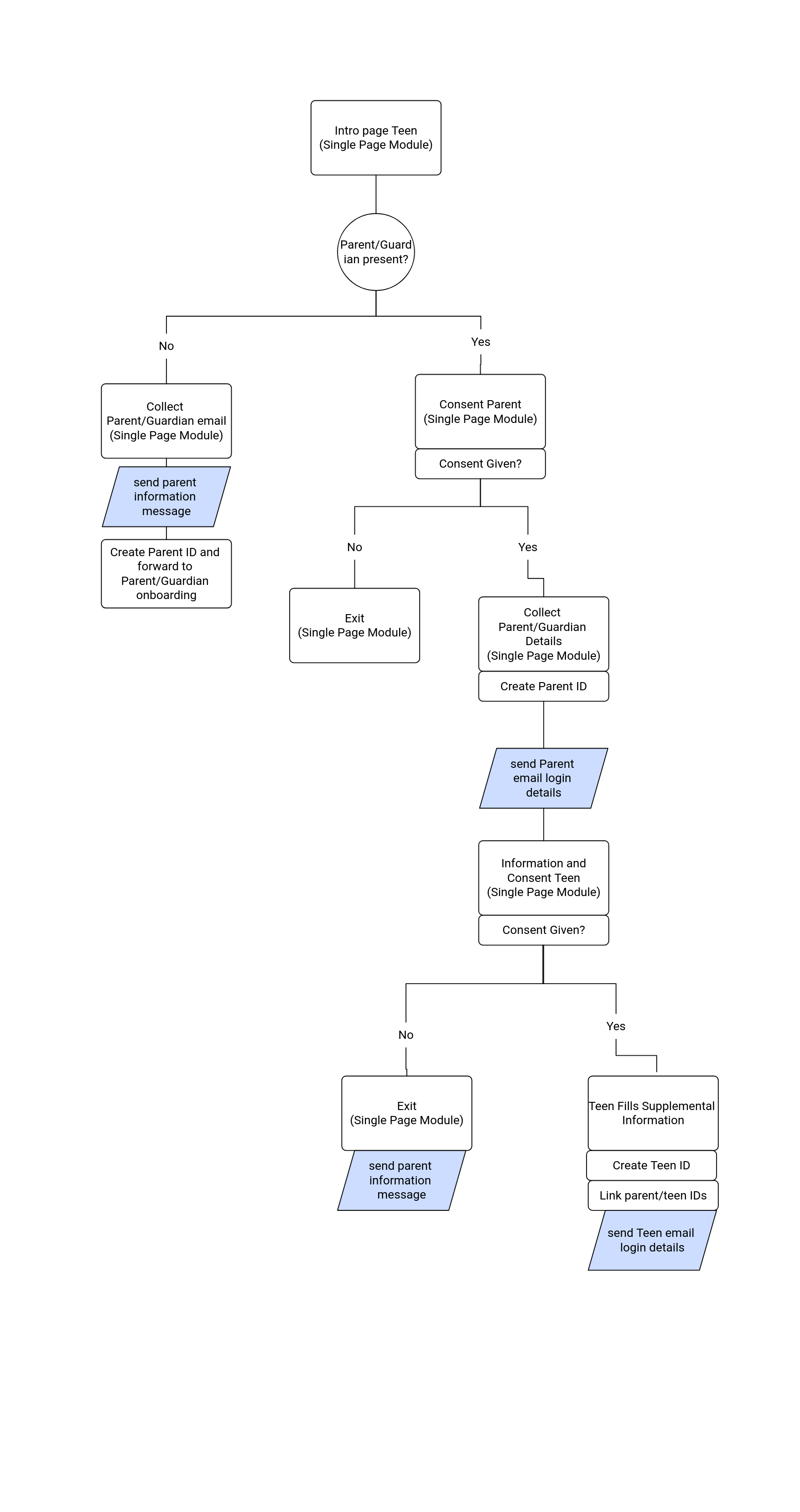
Onboarding flows can be customised based on participant demographics and include pathways designed to meet research ethics requirements for consent/assent to studies. These flows can also link user types (for example setting up the relationship between a participant and their guardian automatically).
Following onboarding, participants are streamed into their chosen Study and can then be directed to subsequent studies via the use of another URL.
Inter-User Permissions
The StudyUser model includes permission statements which can limit the visibility of data between one user type and another.
The permission model implements default protections on data types and participant information. These permissions can be customised to meet the requirements for interactions between users.
Relationships between users are explicity stated. For instance, a clinician can only see data from participants which they are linked to, and a researcher can only see data for participants from their assigned site.
User Interfaces
There are two main interfaces for the Juuri system:
- Administrator and researcher interface
- for
super admin,site admin, andresearcherroles
- for
- End-user interface
- for
participant,guardian, andclincianroles
- for
The administrator interface is used to create content, design studies, and administer users. The end-user interfaces are available for different roles and can be customised to a particular organisation’s requirements.
This allows for branding and theming of the end-user interfaces to create a user experience specific to the use-case (see End-User Interface section). The end-user interfaces are built from re-usable components and menus.
Administrator Interface
Juuri includes a full web-based Content Management System (CMS) for Researchers. This includes the following components:
- Dashboard and Messaging
- Study Builder
- Tree View
- Drag-and-drop module/survey/rule system
- Variable Manager
- Rule Builder with user-defined logic
- Study Analytics
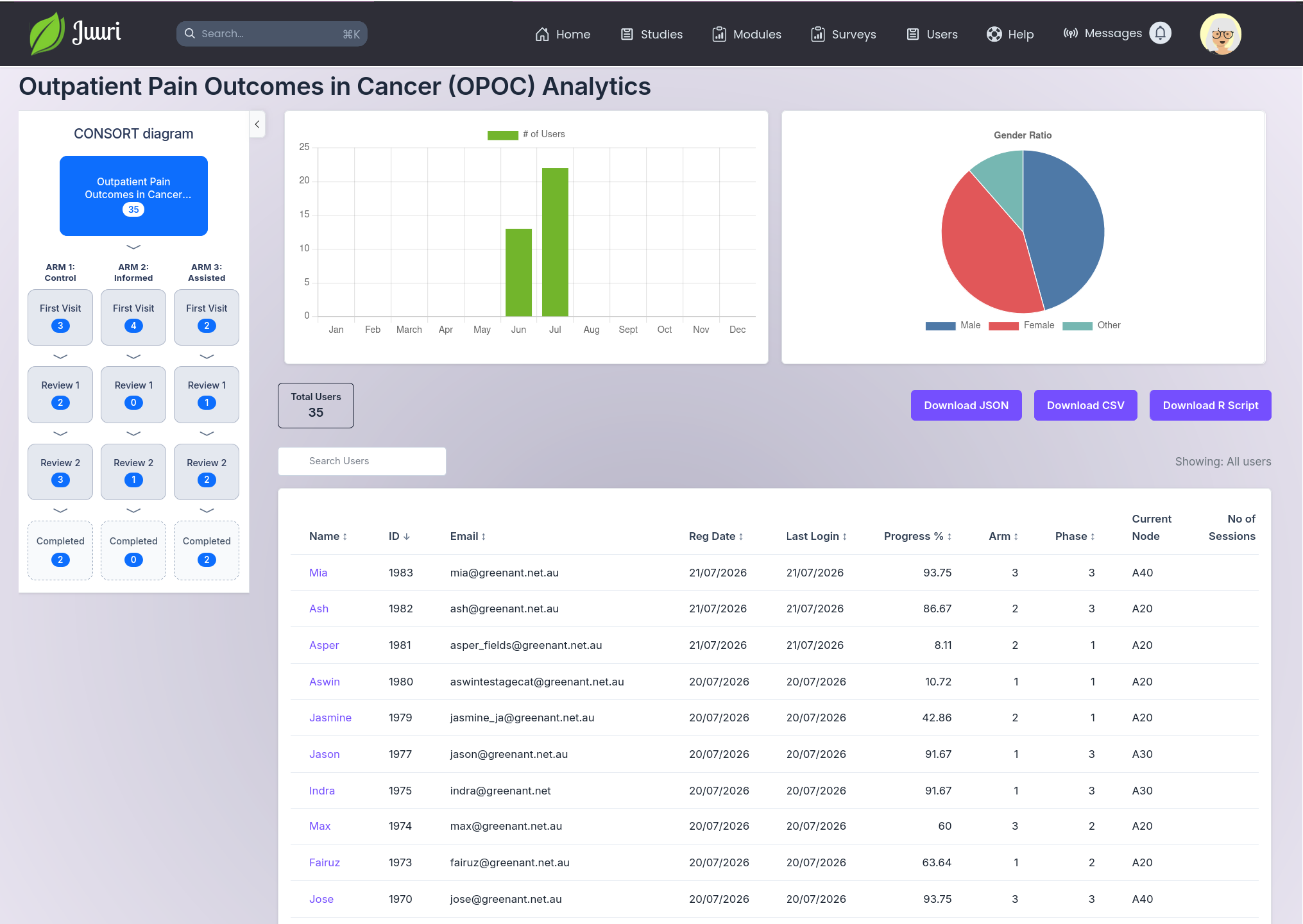
- CONSORT chart with live totals
- Group statistics
- Individual statistics and reports
- Module Builder
- Media Manager
- Content Builder
- Live Preview
- Survey Builder
- Integrated variable assignment
- User Manager
- User details and settings
- Study group and site settings
- Site settings
- User groups settings
- Study link generator
These components are designed for easy access of all study components and allow complete construction and monitoring of studies. Study and user management as well as real-time study data are all available from a unified interface. Importantly, multiple users can collaborate on producing studies, as the builders are multi-user aware.
This section will provide an overview of some of the builder components, further information is available regarding the user of the interface in instructional videos and user documentation.2
Study Builder
The Study Builder is the main dashboard for researchers to build studies. It is divided into three main panes:
- Left Pane
- Study CONSORT diagram (shows Parts of study)
- Variables editor
- Time-based rules editor
- Middle Pane
- Part editor (tree view)
- Rule editor (including visual logic editor)
- Right Pane
- Rules Browser
- Modules Browser
- Surveys Browser
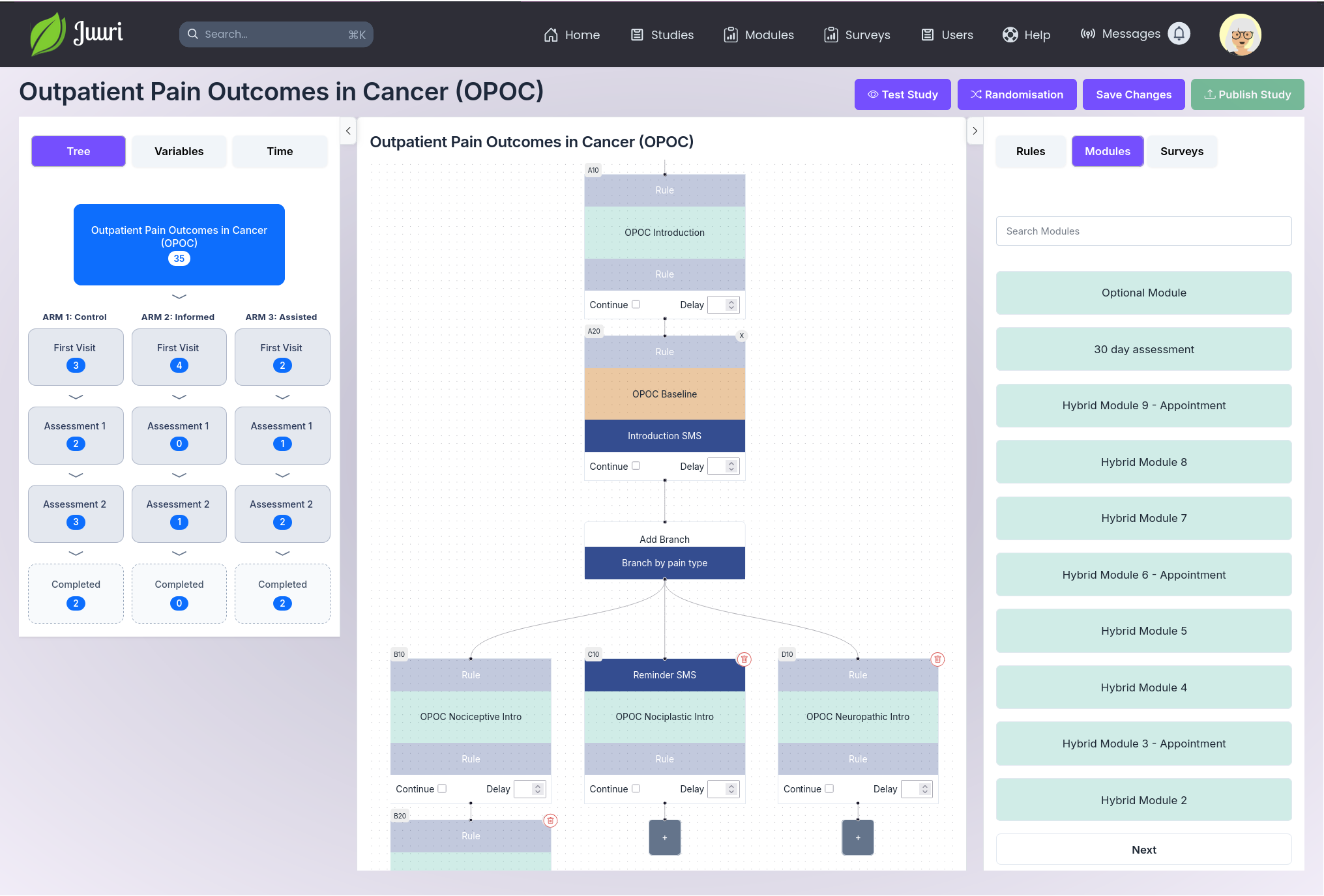
When building a study, the user first builds the Part structure and Randomisation of the study and then edits the Parts. A block-based randomisation algorithm is built-in to the Study Builder, with support for variable block size, and stratification by age and gender.
The studies are built up using a visual flow-chart builder in the Part Editor. Each node in the flow chart can have content Modules dropped-in from the content built in the Module and Survey Builders. The interface was designed to be intuitive for new users, yet powerful enough to create detailed study pathways.
The Study Editor provides a simple overview of how a study is constructed. It also allows for testing, validation, and publication of a study.
Study Analytics
Study data can be viewed in real-time, including selected analytics and participant summaries. This view allows filtering of results by study stage and identification of participants who may be at risk of drop-out or who meet criteria for further follow-up.
Juuri permits customisation of key metrics for each study.
Module Builder
The Module Builder is used to edit and test Modules. It includes an editor with real-time preview, templating functionality, and a revision/rollback functionality. The Module Editor provides a rapid method for building rich contents. It utilises modern Markdown-based editing, and allows easy re-use of media via the Media Browser.
Users can also import existing content in a variety of formats.
The editor allows images, video, audio, and interactive content to be added to Modules via a drag-and-drop functionality and also allows real-time preview of content.
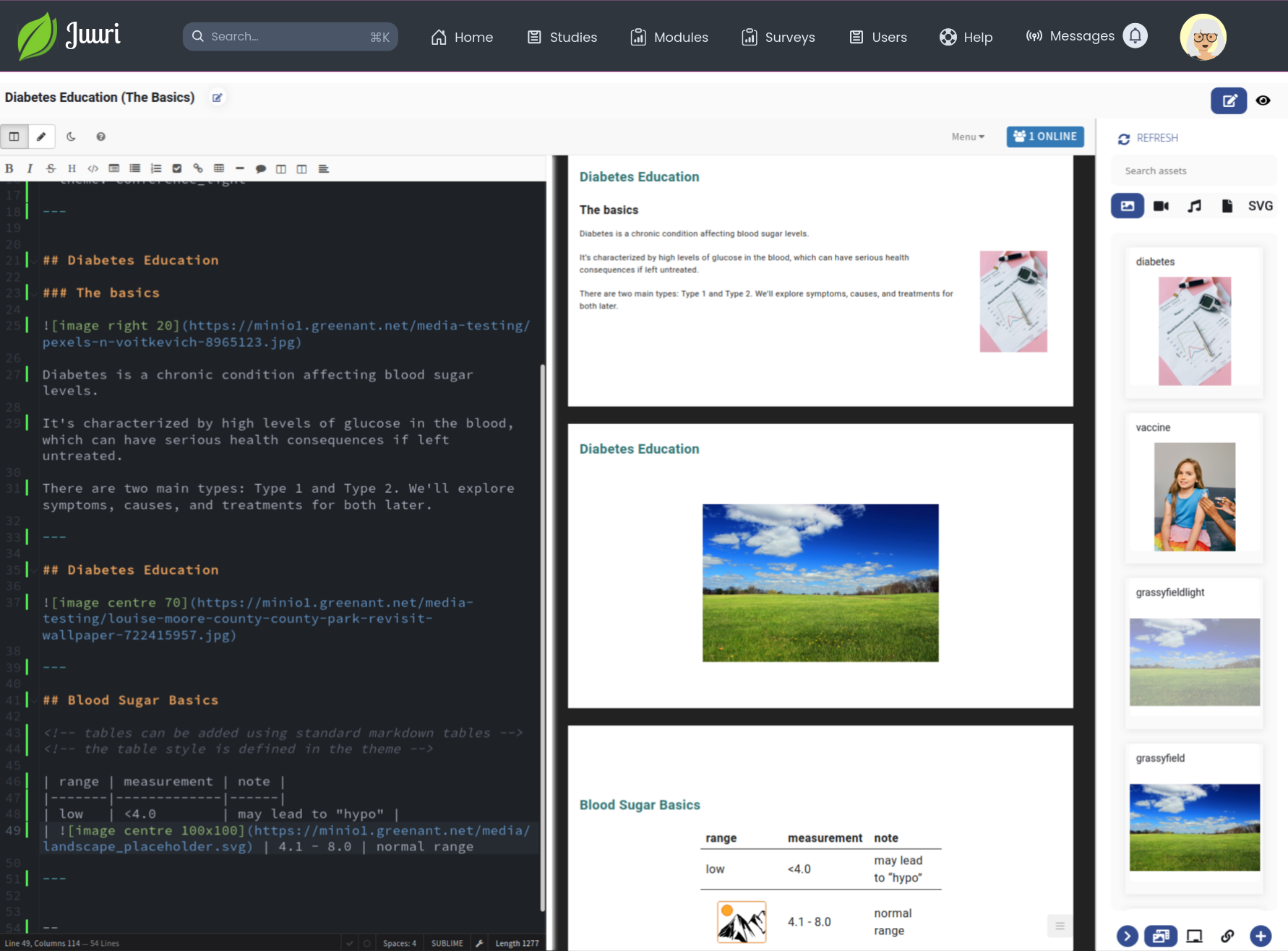
To maintain consistency of content, users can utilise module themes, which can be applied to existing content without having to rebuild the modules.
Survey Builder
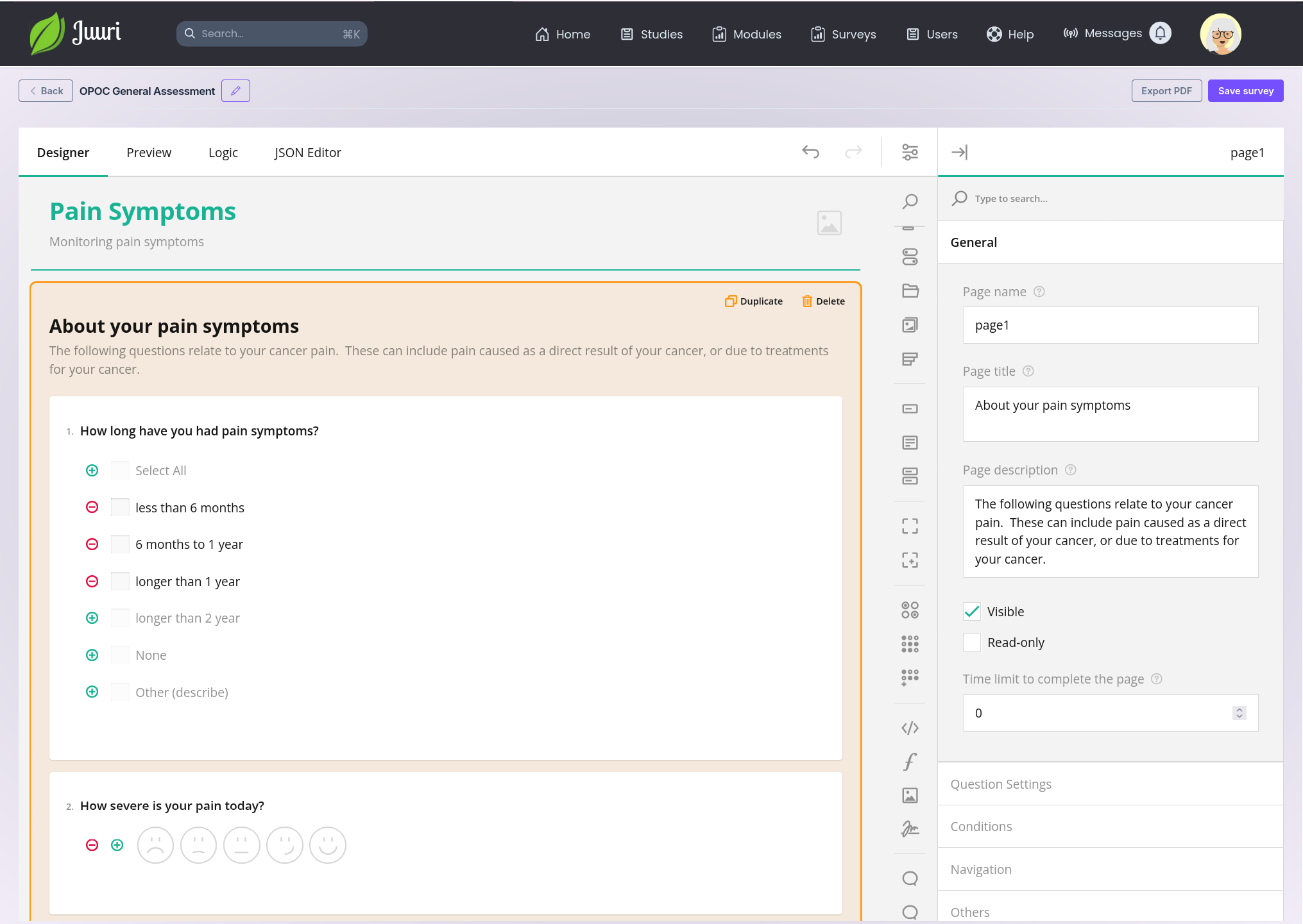
The Survey Builder allows building of surveys in a editor which is intuitive and robust. Custom question types can be added and variables can be assigned to question outcomes.
The Survey Builder also supports internal logic, permitting complex questionnaires with partial visibility of questions to be implemented.
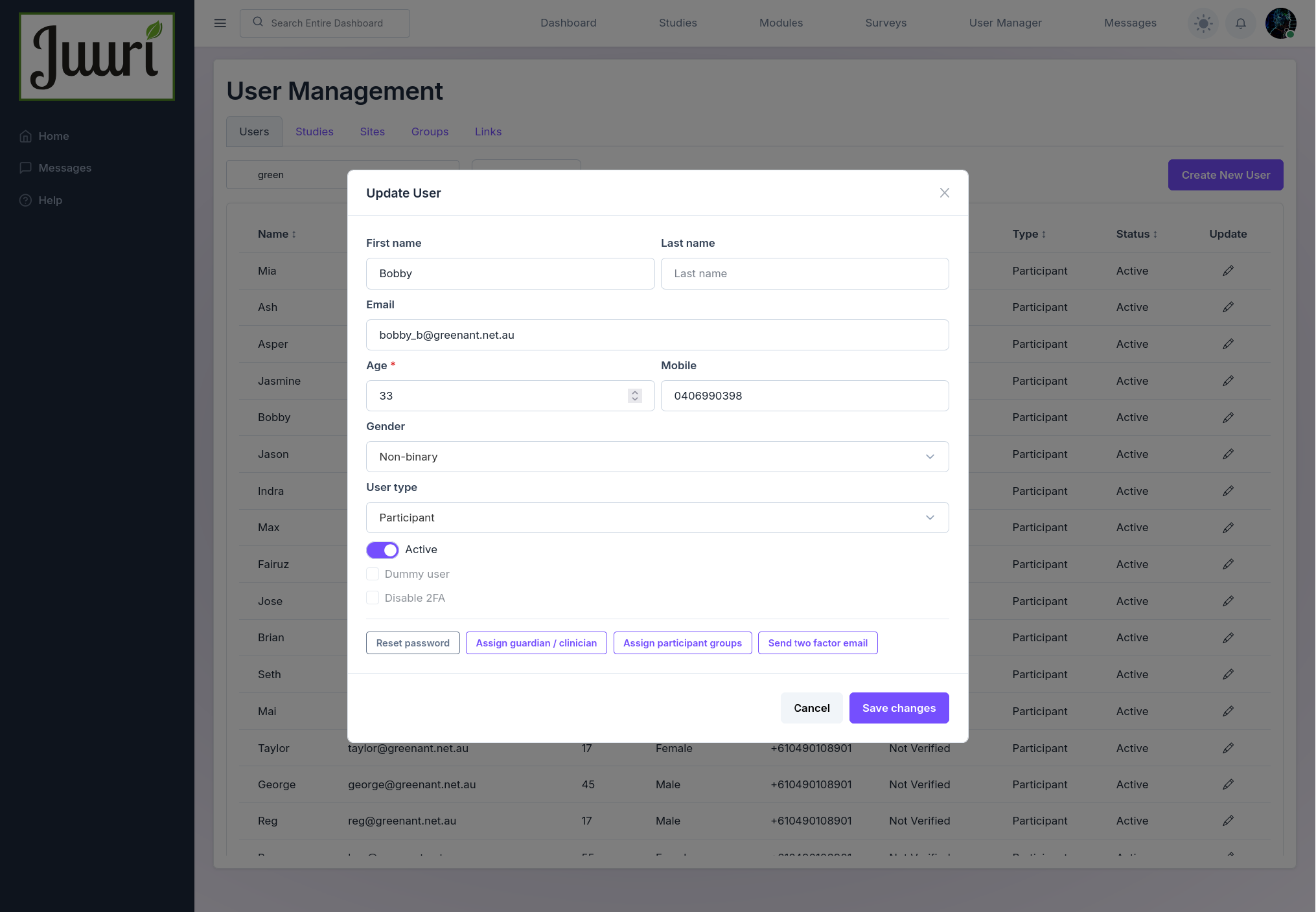
User Manager
The administrative interface for Juuri includes extensive user management tools. These allow administrators to undertake a number of user management tasks:
- create new users
- reset passwords and 2FA codes
- link users together
- assign users to groups/sites
- invite new users
End-User Interface
Studies can be delivered to end-users over web browser and mobile devices. It is also possible to deploy Juuri as an mobile phone App. The main aim of the end-user interface is to provide a flexible and modular environment that can display study components and guide users through content.
While not all studies will require the full range of end-user components, Juuri includes support for:
- Interactive Dashboards with guidance and suggestions to users
- Messaging and Alert functionality
- User Profile editing
- Rewards and checkpoints
- Summary Reports
- Graphs based on real-time data
- Privacy and Visibility settings
The images below include some examples of Juuri end-user interface appearance. The design and appearance of the participant pages can be customised to meet individual study graphics and branding.
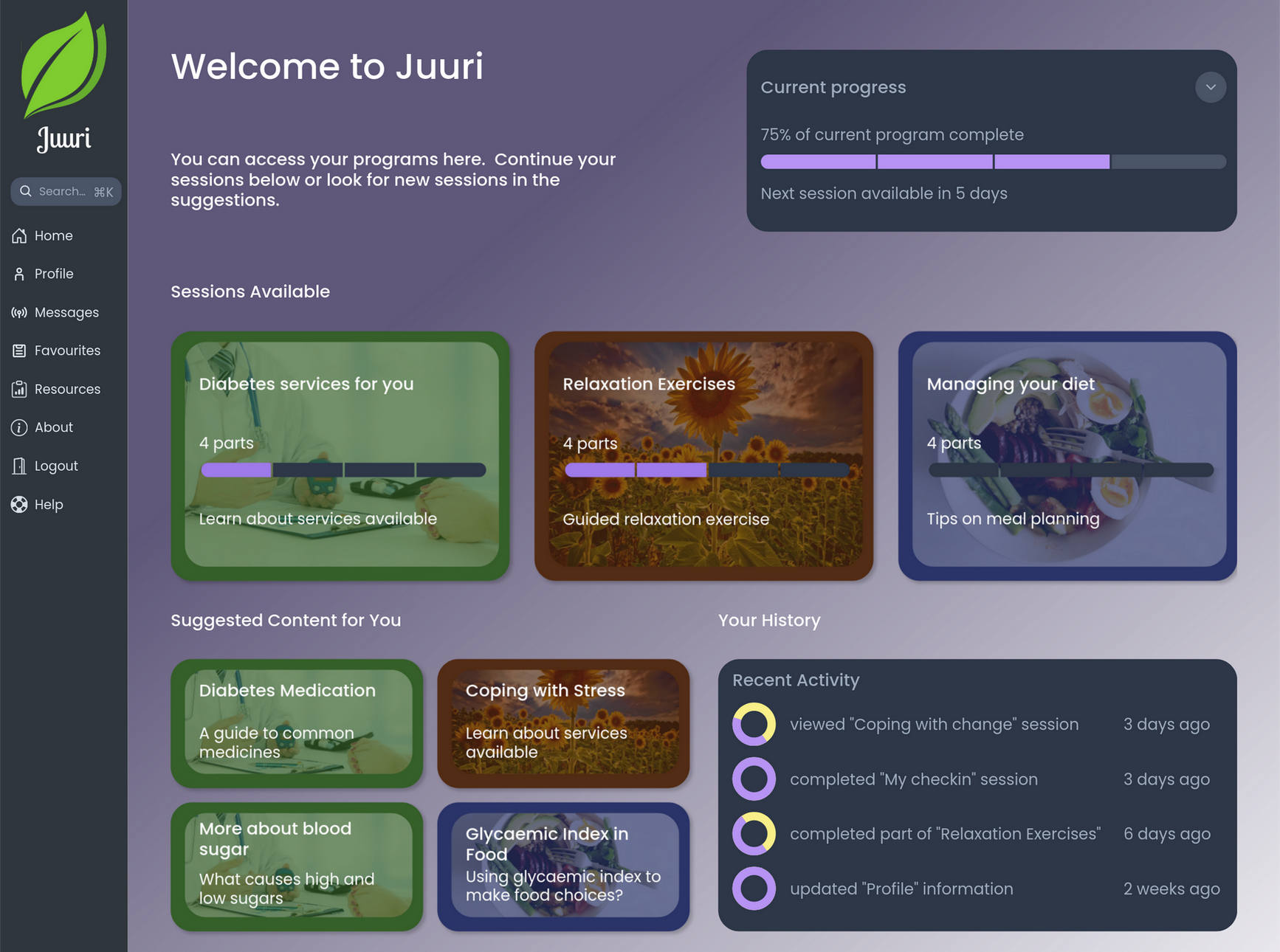
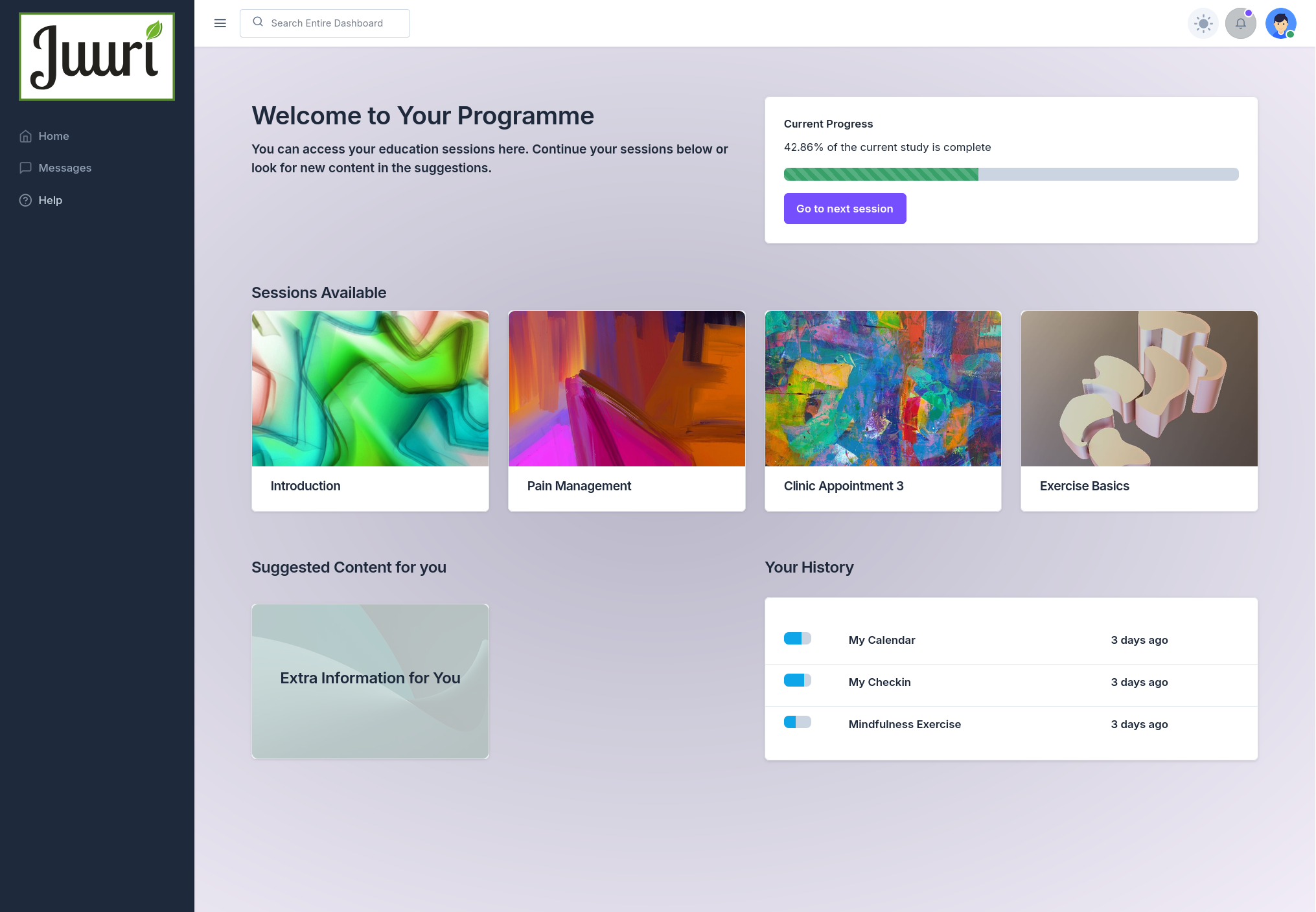
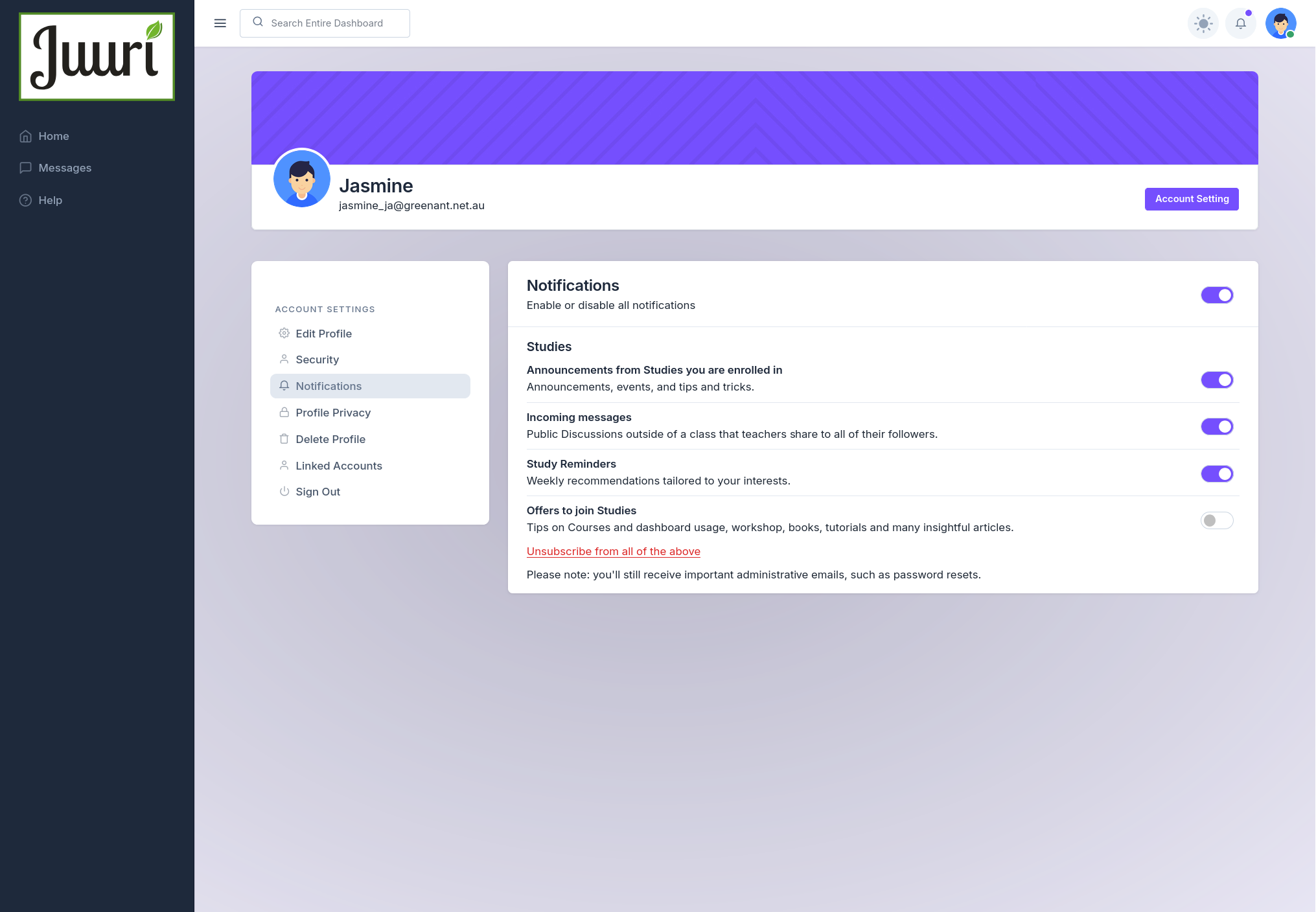
Different user types can have customised dashboard appearances and functionality. For instance, clinician dashboards include the ability to follow the progress of participants assigned to that clinician.
The participant front-ends are designed to meet accessibility requirements (WCAG AA).
Infrastructure and Hosting
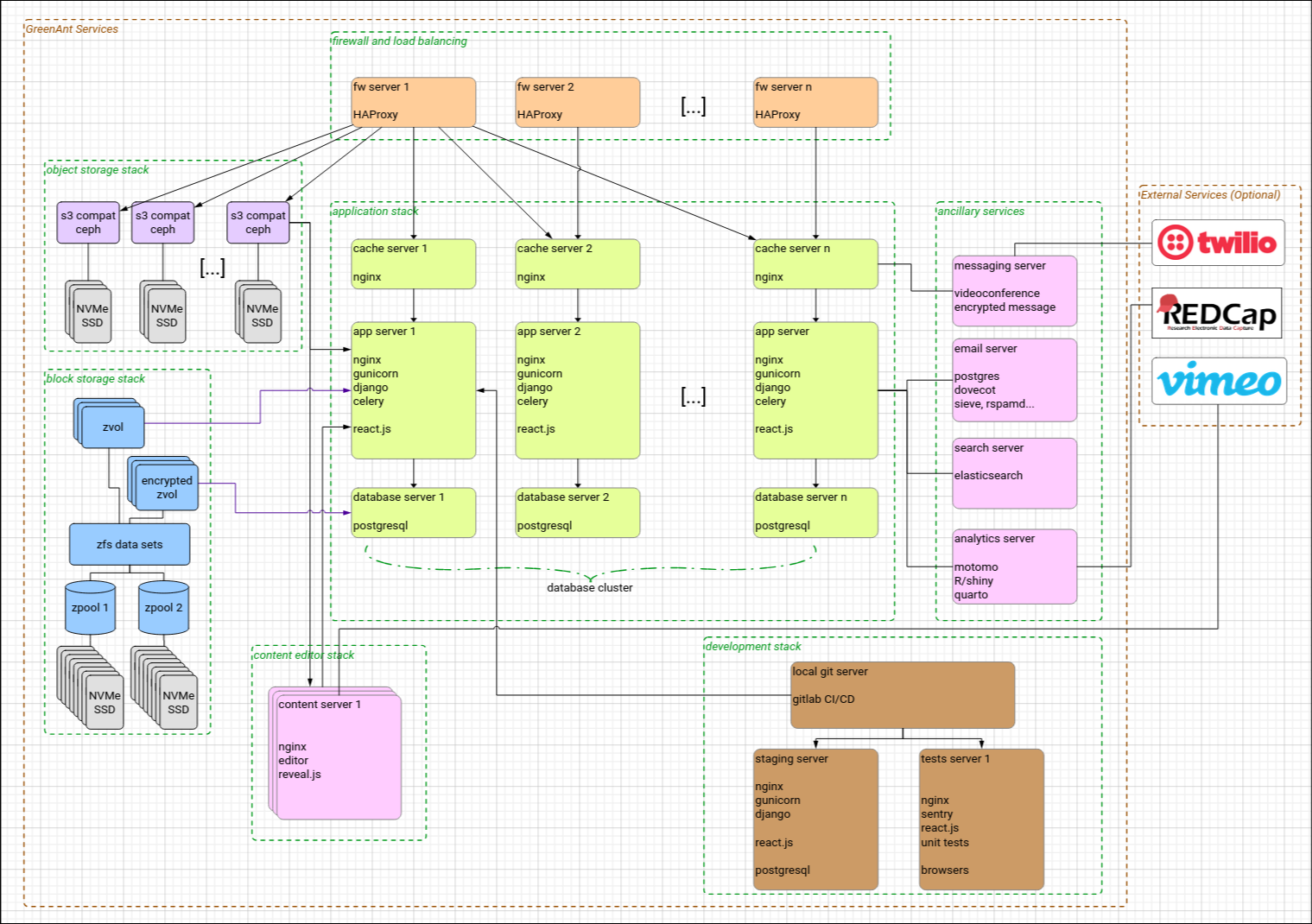
The Juuri platform is deployed in a high-availability environment hosted by GreenAnt Networks. It is deployed in a modular application stack with built-in encryption, snapshotting, and data protection services.
Over the history of deployment, the Juuri servers have consistently achieved 5-nines availability (99.999% uptime). The system is designed for updates without user interruption.
Juuri can also be deployed on-site for organisations with specialised needs, and be connected via secure APIs to external services.
The Juuri platform allows for both horizontal and vertical scaling and provides low-latency response to thousands of users. All components of the Juuri platform are modular in nature, which allows for incremental development of new features as well as optimisation for specific workloads.
Security and Privacy
Juuri is built for medical data. The platform undergoes regular security auditing and penetration testing. We work with organisations to assess a whole-of-project security assessment to ensure that the minimal set of identifiable data is maintained and that data assurance, security controls and auditing is built into all steps of data management.
Security technologies include:
- Access controls including MFA
- Encrypted-in-transit security
- Minimum data access API model
- Proactive vulnerability discovery and patching
- Secure environment, all data stored in Australian data centres meeting ISO 27001: 2013, ISO 9001: 2015, ISO 14001: 2015, and ISO 45001: 2018 standards.
- No third-party data-processors, all data and metadata stays within Australia
Support Infrastructure
GreenAnt Networks provides timely and expert support for the Juuri platform. We maintain comprehensive end-user documentation and provide issue-tracking, email and phone support to research teams.
We can also provide training in the use of the platform and data migration services.
The GreenAnt team is highly experienced in providing researchers with expert information. Our team includes clinical scientists with extensive data science experience. We have a team of experienced Juuri experts to help with designing studies, porting content, and can provide statistical analysis services.
Technical Development
The Juuri platform is under active development. This includes regular updates and optimisation as well as new feature development. Our development team can provide custom programming support to organisations using the Juuri platform.
All development is managed through a secure pipeline, hosted by GreenAnt Networks. Staging and testing servers are available to researchers as part of the development pipeline, to ensure new features undergo user testing and formal acceptance before deployment.
GreenAnt can provide custom integrations to synchronise data with existing data sources and integrate with research systems.
Footnotes
The name “Juuri” is derived from the Finnish word for the roots of a tree. This name was chosen to indicate that Juuri provides a stable base for the branching logic built into the platform.↩︎
Users have availability to an easily searchable documentation website with step-by-step instructions and helpful examples. There is also an extensive development and API reference available for system integrators.↩︎
Reuse
Commercial in confidence - please do not redistribute.
Copyright
Copyright GreenAnt Networks 2026. All Rights Reserved